Policies & Rates
Policies
Food and Drinks
Food and Drinks are not allowed in any of the Flow Cytometry Core Facility laboratories.
Logging on to Instrument Workstation
Enter your ONYEN and Password under the AD domain.
Logging off of Instrument Workstation
Please log off the workstation PRIOR to ending the kiosk appointment when you are finished. You may be charged for extra time if you do not.
Instrument Cleaning
Follow the cleaning listed in the Quick Reference, user guide, or affixed to the instrument. Please clean any spills and throw any used pipet tips, tube, tube caps, aluminum foil, ect. in the trash. Large spills involving BSL2 material should be reported to staff immediately.
Time Management
Make sure you stop your run before the end of your scheduled time to perform cleaning, and in order not to delay the next user.
Appointments on Flow Analyzers
- You are able to freely delete, edit, or reschedule appointments on the flow analyzers up to 36 hours prior to your scheduled time
- Within 36 hours of your scheduled appointment the iLab scheduling software locks you out from deleting/reducing/rescheduling.
- If you cannot make a scheduled appointment (after the lockout time- 36 hours) you should cancel your appointment to make the time available to others.
- Unlike deleting an appointment outside of the 36 hour window a cancellation, a cancellation will be charged a cancellation fee, 20% scheduled instrument time.
- For staff-assisted appointments, the cancellation fee is the cancellation fee plus up to 1 hour of staff time.
- If you do not cancel your appointment and do not show up you will be charged a No Show fee, 1 hour of instrument time.
- If you have an allowed excuse (you are sick, kid is sick, etc.) we will waive your charges. Please notify us by emailing Core Staff as soon as possible.
- Please be mindful of your time. Repeated and/or excessive overbooking/cancellation will be discussed with the user and billing PI.
- In all cases where staff assistance is required, a delay of 30 minutes (without previous notification) will result in a cancellation of the appointment. Any delays should be communicated with staff as soon as possible.
Appointments on sorters
- Sorter appointments need to be cancelled 72 hours prior to the appointment to avoid a charge. Cancellation fee is 20% instrument time. The fee may include the set-up fee if cancellation is same-day.
- For staff-assisted appointments, the cancellation fee is the standard fee plus 1 hour of staff time.
- Allowed and disallowed excuses are the same as above for the analytical instruments.
- In all cases where staff assistance is required, a delay of 30 minutes (without previous notification) will result in a cancellation of the appointment. Any delays should be communicated with staff as soon as possible.
Early Arrivals
Appointments on analytical cytometers can be started up to 30 minutes early if the instrument is not in use. Just log onto through the Kiosk as usual.
Extensions
Appointments on analytical cytometers can be extended in 15 minute intervals until the next scheduled booking using the extend button available in the Kiosk. You will only get charged from the time you start your Kiosk session to the time you terminate the session, but we do ask that users try to avoid excessive overbooking.
Late Arrivals
Appointments are available to be started up to 60 minutes after scheduled start time. If the appointment is not started within the first 60 minutes, the appointment will be considered a No-Show.
The UNC Flow Cytometry Core is dedicated to delivering an exceptional training experience. Users are able to get trained on any of the analyzers in the core and/or our BSL1 sorter the FACSMelody. Currently, we do not train users on the BSL2 sorters. To help assure that each individual that gets trained receives the staff’s full attention and can independently run the cytometer, we:
- Conduct all of our trainings 1-on-1
- Train users on each instrument individually
- Require that the Initial and Follow-up in-person training dates are within 2 weeks
- Require that users provide samples for the Follow-up in-person training (for the Aurora, ImageStream, and FACSMelody we additionally require that users provide samples for the Initial training)
Note: Use of instrument without facility staff training is forbidden. User-to-user instrument training is also forbidden. In a case where this is discovered, disciplinary actions will be undertaken.
Data Storage on Cytometer Workstations
Any data saved on the local hard drives of the cytometers’ workstations or in the cytometer software must be deleted immediately after data collection. Flow Core staff will delete any data left in the Cytometer Software during weekday startup.
Flow Cytometry Core Facility Data Management Policy
The Flow Cytometry Core Facility provides temporary data storage and management solutions to facilitate users’ analysis and research needs. Users are responsible for maintaining backups of their data outside the facility’s infrastructure.
1. Temporary Data Storage:
- The Network Server is available for temporary storage of FCS/ISX data, with a retention period of up to 90 days in designated folders.
- Data will be automatically deleted from folders on the first Saturday of each month by an automated program.
2. Data Responsibility:
- Users are solely responsible for their data. It is recommended that users create at least two backups: one on their lab/office computers and another on an external drive or optical disk.
- The facility does not back up or archive user data. If old data is needed, clients must contact IT directly or request assistance through facility staff.
3. Local Data Management:
- No data should be permanently saved on the local hard drives or within the software of the cytometers’ computers. Temporary saving is allowed but must be deleted before the user exits the session.
- Staff clear local hard drives to assure space is available for all users.
4. Staff-Managed Data Handling:
- Data collected by facility staff as part of service requests will be delivered to users via OneDrive and attached to the iLab request. Staff will retain this data for no longer than one year.
- Users are encouraged to download and secure their copies of staff-provided data promptly.
5. Access and Onboarding:
- Users will receive an ‘ONYEN folder’ on the Network Server upon completing training on a specific instrument. This folder is accessible only to the designated user and facility staff.
- If you do not have an ONYEN or cannot locate your folder, please contact the FlowCore for assistance.
6. Network Server Access Instructions:
- For guidance on mapping the Network Server on Windows or Apple computers, refer to the facility’s provided documentation below
- Follow the instructions below to map the Network Server:
Tips:
- When analyzing FCS files, work with them from your local computer’s hard drive as it is faster and safer (in case your computer drops the connection to the server).
- Data from the ImageStream (ISX) needs to be saved first to a local hard drive then transferred to the J: Drive Server- make sure there is enough local storage prior to starting your appointment. Contact staff for help.
Under Weather Conditions 2 and 3, users should assume that the core staff will not be available, and the typical daily instrument start-up, QC, and shutdown will not be performed. Core staff will notify users to reschedule requested Staff-Assisted Sorting, Training, or Acquisition services. Under these conditions Cancellation fees are waived. Where applicable under UNC policy, users will be able to access the UNC Flow Cytometry Core Facility for independent use of instruments.
Under Weather Condition 1 the core staff will make every effort to maintain typical core operations, but will communicate with users if staffing requires rescheduling requested services.
Please be aware of the Flow Core policy for letters of support. You must arrange a meeting with the Flow Core Director, Ramiro Diz, a minimum of 2 weeks prior to the time the letter of support is needed. This can be done by requesting a consultation request in iLabs.
The use of analytic flow cytometers and, especially, aerosol-generating sorters with samples that contain viable infectious organisms presents a serious infectious risk to the Facility users and staff. For the analyzers the main risk is contamination of external surfaces or a sample spill, while for sorters the main risk is aerosol generation. To minimize risk to users and staff we ask that everyone follows the safety guidelines below.
Analyzers
All areas of the flow core that house analyzers are now designated as BSL2, and all samples should be handled and treated as BLS2 at all times.
The investigator must comply with the following rules:
- Wear PPE – latex/nitrile gloves, lab coat and closed toe shoes are to be used at all times.
- Safely Transport Samples – Samples are to be transported to and from the analyzer rooms in an approved biosafety transport container – see details below.
- Notify Staff and Clean Spills – If any sample is spilled in the room it is to be reported to Facility staff and cleaned up using bleach.
- Use Biohazard Waste Bins for Disposal – Any samples or contaminated materials should be discarded into the red biohazard waste bag provided. No samples or other contaminated materials are to be disposed of down the sink.
- Clean the Instrument after use – When finished running your samples, follow the cleaning procedure posted on the instrument.
Sorters
The use of biohazardous samples on the sorters poses an elevated risk due to the generation of aerosols. Under most conditions, the aerosols are contained, but some aerosol may drift away from the instrument. The risk of aerosol exposure is particularly high when the stream hits a solid surface – as may happen when there is a partial clog in the sorting nozzle.
The sorting of viable biohazardous materials (including any human cells) may NOT be performed on the FACSMelody.
BSL-2 designated samples may only be sorted on the FACSAria II and FACSymphony S6 by trained staff.
If you have any questions about your sorting of biohazardous samples please contact Ramiro Diz, Facility Director, or Ayrianna Hedgecock, lab safety manager. For more information contact EHS Biosafety.
Transporting Samples to the Flow Facility
- All transfers that involve entry of a common corridor require the following packaging and labeling: At a minimum, all materials are to be double-packaged prior to transport. At least one layer of packaging must be leak-proof if the material is a liquid. Example: placement of a leak-proof Vacutainer blood tube in a tube rack, and then placing the rack in closeable carrier (e.g. Igloo cooler).
- For packages containing liquids, absorbent material must be included in sufficient quantity to absorb the entire contents of the primary container should a spill occur.
- The outer sides of the carrier must be sprayed (prior to transport) with a disinfectant that is effective against the potentially infectious material(s) used in the laboratory. Hard plastic exteriors are best for clean ability. Once this step is complete, the outer surfaces of the carrier are considered safe for handling with bare hands. Lab coats and gloves should not be worn when transporting carriers outside the laboratory.
- A biohazard warning label shall be applied when applicable to the carrier to communicate the potential hazard of its contents. Any potentially infectious material (e.g., human blood, unfixed human tissue, bacterial culture) would require the biohazard label.
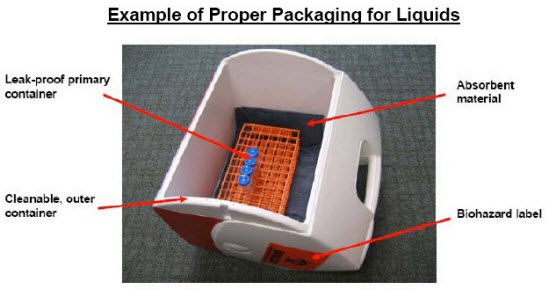
Note: It is also acceptable to have sample in capped 5 ml FACS tubes, on ice and inside a small lidded, styrofoam container; this styrofoam container must be placed inside the closable carrier (e.g., Igloo cooler) with absorbent material for transport.
-
Any data generated in the Facility that comes from patients must have the patient’s privacy protected as dictated by HIPAA rules.
-
If you run patient samples on our machines (research only) and store your data on any of our machines or our data server you must observe the HIPAA regulations.
-
Any data stored on our hard drives (cytometer computers or data server) must not have any traceable information that could connect this data to a patient.
-
If you violate this and patient privacy is impacted you are responsible – not the FlowCore Facility. If this happens, your laboratory will also have its right to use the FlowCore Facility revoked.
NO RADIOACTIVE MATERIALS ALLOWED
Samples containing radioactive materials are NOT permitted on any of the Facility’s instruments nor in any of the Facility space.
Disciplinary Actions:
- First Violation: The user will receive a written warning detailing the nature of the violation and the required corrective actions.
- Second Violation: If the user commits a second violation of the same nature within a 12-month period, they will receive a second written warning and may be required to undergo additional training. The PI will also be informed of the violation.
- Third Violation: A third violation within a 12-month period will result in the revocation of the user’s access to the instrument(s). Access will only be mediated through FCCF staff (staff-run appointments) until otherwise determined by corrective measures. The user and PI will be required to meet with FCCF management to discuss the violations and agree on corrective actions.
- Severe Violations: For severe violations, such as unauthorized access or instrument tampering, the FCCF reserves the right to immediately suspend the user’s access to the instruments. The user and PI will be notified in writing of the suspension. The user and PI will be required to immediately (within 1 week) meet with FCCF management to have corrective actions discussed.
Escalation Process:
- Initial Review: All violations will be initially reviewed by FCCF staff; the user will be notified in writing (email) and given an opportunity to respond.
- Core Director Review: If the user disputes the violation, the matter will be escalated to the Core Director. The Core Director will review the violation and action taken and make a final decision.
- Mediation: If the dispute remains unresolved after the Core Director’s review, the parties agree to participate in mediation via a member of the FCCF Internal Advisory Board (IAB). Decisions made through this process will be honored by all parties involved.
Hours of Operation
Facility staff are only available during normal university work hours for assistance.
If you require badge access to the core facility outside of the regular hours (9am-5pm), please send your Photo ID badge number to your trainer.
Rates
Up to date service rates can be found on the UNC Flow Core iLabs page. If you have any questions about our rates please contact us.
As per University policy, Shared Resource Labs (SRLs) or “Core” facilities, are required to reevaluate their rates every 2-year period to reflect current usage levels, changes in institutional support, maintenance costs, and personnel costs. The most recent rate update was put into effect May 1, 2025.