Display External News or Events on Your Site
Sometimes you may want to display a news story or event on your website even though the full content is published somewhere else. For example, a story may appear on the UNC Health Newsroom or another official site that is relevant to your department.
Because of copyright and content ownership considerations, you should not copy and republish content from other websites. However, you can link to that content while still displaying the item in your own site’s news or events listings.
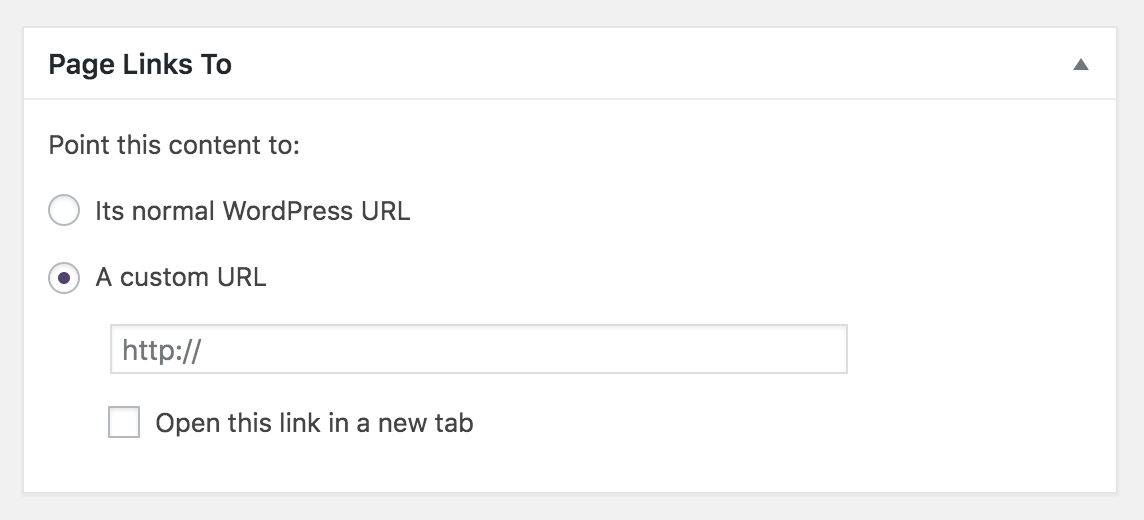
This can be done using the Page Links To plugin, which allows a News Post or Event on your site to redirect visitors to an external page when clicked.
From the visitor’s perspective, the item appears in your news or events listings like normal content, but selecting it takes them to the original source.
Why Linking Is Preferred
When content is owned by another website, it should be linked to rather than copied.
This ensures:
- The original source receives proper credit
- Visitors always see the most current version of the content
- Your site avoids copyright and licensing issues
- You do not need to maintain or update duplicated content
Examples
Media Coverage
Local or national news organizations may interview or quote your faculty or physicians. Rather than copying the article, create a news post that links directly to the media coverage.
Examples include stories from outlets such as WRAL, national newspapers, or other media organizations covering research findings, clinical expertise, or public health commentary from your department.
Journal or Magazine Features
Faculty research is often highlighted in academic journals, magazines, or industry publications. If an article or feature about your faculty appears in a publication outside the SOM web system, you can create a news post linking to the original source.
This allows you to highlight the recognition while ensuring the content remains hosted and maintained by the publisher.
UNC Health Newsroom or UNC Health Talk
The UNC Health Newsroom and UNC Health Talk regularly publish stories featuring SOM departments, physicians, and research.
If an article relates to your department or audience, you may want to highlight it in your site’s news listings.
Examples:
- 2024 Dean’s Performance Award Winners
- UNC School of Medicine Among Top 5 Public Universities to Receive NIH Funding in 2025
- The Department of Urology linked to the “3 Things to Know About Prostate Cancer” article on UNC Health Talk
Other SOM Websites
Sometimes content relevant to your audience appears on another School of Medicine website. If the need to highlight that content is occasional, create a News Post or Event on your site and use the Page Links To plugin to redirect visitors to the original content.
Example:
- The Department of Allied Health Sciences linked to the article
“Ingersoll Selected as Next Chair of the Department of Health Sciences” on the SOM Intranet website
However, if you need to display content from another SOM site regularly or continuously, a better approach is to use a Syndication Cell.
Syndication Cells can display posts from:
- Other SOM website
- Multiple SOM websites
- A specific category of posts or events
It allows your site to automatically display new content as it is published without manually creating individual posts.
Use Page Links To when you want to highlight a specific post occasionally.
Use Cells Syndication when you want to continuously display posts from another site(s).
University News and Announcements
University offices often publish announcements that may be relevant to SOM departments or programs.
Examples:
- University Teaching Awards announcement on the UNC Office of the Provost website
- New K12 Scholars for 2026 article on the NC TraCS website
- Articles from Carolina Stories such as “The Enduring Legacy of Dr. Aziz Sancar“
- Articles from UNC Research
- Articles from Carolina Alumni
Partner Institutions or Research Collaborations
Collaborating institutions, research networks, or public health organizations may publish stories related to joint projects with SOM researchers.
Partner Organization Events
External organizations may host events relevant to your program, faculty, or students. You can create an event on your site that redirects to the official event page.
This allows your audience to discover the event through your site while ensuring registration and details remain managed by the host organization.
Conferences
Departments may want to highlight conferences relevant to their field or conferences where their faculty are presenting.
Example:
The Department of Anesthesiology highlighted the “13th Annual Wake Forest-UNC-Duke Pediatric Anesthesiology Conference,” where registration and event details were hosted on the Wake Forest website.
Promoting Content on Your Own Site
This technique can also be used to highlight or draw attention to content on your own site.
Example:
The Department of Anesthesiology publishes their annual newsletter and promotes it through a news post that links to the newsletter page.
How To
- Create a News Post or Event on your site.
- Add:
- A Title
- Excerpt information
- Featured image (optional)
- A Category (if needed)
- Scroll to the bottom of the post or event and in the Page Links To field, enter the URL of the external article or event.
- Publish the Post or Event.
- When visitors click the post or event, they are redirected to the external page.
Identifying Redirected Posts or Events
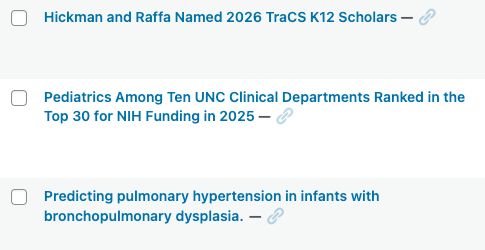
In the Dashboard, posts or events that use the Page Links To plugin can be identified by a link icon that appears to the right of the post or event title.
This icon indicates that the item redirects visitors to another URL rather than displaying content from your site.