Table Styles
Covered in This Tutorial
How to Add Styles
There are a variety of pre-built styles that you can apply to tables. These styles can be applied by adding one or more CSS classes to the <table> element in the HTML.
- Save any changes you’ve made. This ensures that if you make a mistake when editing the html, you can use Revisions to undo only the table style edits without losing other updates.
- Copy the class(es) from the examples provided below that you wish to apply to the table.
- Switch to the Code view:
- In the editor, click on the Code tab to see the html version of the page.

- Tip: before switching to the code view, highlight the first piece of content inside the table. It will remain highlighted in Code view, making it easier to locate the <table> element.
- In the editor, click on the Code tab to see the html version of the page.
- Locate the <table> element:
- It will appear just above your highlighted content.
- Example: <table> or <table style=”width: 100%; border-collapse: collapse;”>.
- Modify the <table> element:
- The table element may already have some styles applied such as <table style=”width: 100%; border-collapse: collapse;”>.
- Delete only the style=”…” portion so that just <table> remains.
- Add the class attribute <table class=””>.
- Paste your copied class name(s) inside the quotes.
- Other styles rely on the basic table style for their core formatting.
- Start with the basic table style, then layer on other styles like condensed, striped, bordered, or hover to customize the appearance.
- The resulting html will look something like <table class=”table”>.
- To apply multiple classes, separate them with spaces (not commas). For example <table class=”table table-condensed table-bordered table-striped”>
- Switch back to the Visual editor:
- Click on the Visual tab.
- Note: The styles will not display inside the editor, they will only appear on the published page.
- Save your changes.
- If something went wrong when applying styles, don’t panic. Use Revisions to restore your last saved version and try again.
Style Examples
Each example below shows which class names to use and how the table will appear on the published page. The basic table provides the table foundation. Combinations of other styles such as condensed, striped, bordered, or hover can be added to the basic table to achieve the desired look.
Basic Table
This table uses the following class: table.
Resulting html: <table class="table">
| Day | Lunch | Dinner |
|---|---|---|
| Monday | Soup and Salad | Meatloaf |
| Tuesday | Tacos | Steak |
| Wednesday | Sandwiches | Chicken |
| Thursday | Curry | Roast Beef |
| Friday | Burgers | Pizza |
Condensed Table
This table uses the following classes: table and table-condensed
Resulting html: <table class="table table-condensed">
| Day | Lunch | Dinner |
|---|---|---|
| Monday | Soup and Salad | Meatloaf |
| Tuesday | Tacos | Steak |
| Wednesday | Sandwiches | Chicken |
| Thursday | Curry | Roast Beef |
| Friday | Burgers | Pizza |
Hover Table
This table uses the following classes: table and table-hover
Resulting html: <table class="table table-hover">
| Day | Lunch | Dinner |
|---|---|---|
| Monday | Soup and Salad | Meatloaf |
| Tuesday | Tacos | Steak |
| Wednesday | Sandwiches | Chicken |
| Thursday | Curry | Roast Beef |
| Friday | Burgers | Pizza |
Striped Table
This table uses the following classes: table and table-striped
Resulting html: <table class="table table-striped">
| Day | Lunch | Dinner |
|---|---|---|
| Monday | Soup and Salad | Meatloaf |
| Tuesday | Tacos | Steak |
| Wednesday | Sandwiches | Chicken |
| Thursday | Curry | Roast Beef |
| Friday | Burgers | Pizza |
Combo Striped and Hover Table
This table uses the following classes: table, table-striped and table-hover
Resulting html: <table class="table table-striped table-hover">
| Day | Lunch | Dinner |
|---|---|---|
| Monday | Soup and Salad | Meatloaf |
| Tuesday | Tacos | Steak |
| Wednesday | Sandwiches | Chicken |
| Thursday | Curry | Roast Beef |
| Friday | Burgers | Pizza |
Bordered Table
This table uses the following classes: table and table-bordered
Resulting html: <table class="table table-bordered">
| Day | Lunch | Dinner |
|---|---|---|
| Monday | Soup and Salad | Meatloaf |
| Tuesday | Tacos | Steak |
| Wednesday | Sandwiches | Chicken |
| Thursday | Curry | Roast Beef |
| Friday | Burgers | Pizza |
Combo Bordered and Hover Table
This table uses the following classes: table, table-bordered and table-hover
Resulting html: <table class="table table-bordered table-hover">
| Day | Lunch | Dinner |
|---|---|---|
| Monday | Soup and Salad | Meatloaf |
| Tuesday | Tacos | Steak |
| Wednesday | Sandwiches | Chicken |
| Thursday | Curry | Roast Beef |
| Friday | Burgers | Pizza |
Combo Bordered and Striped Table
This table uses the following classes: table, table-bordered and table-striped
Resulting html: <table class="table table-bordered table-striped">
| Day | Lunch | Dinner |
|---|---|---|
| Monday | Soup and Salad | Meatloaf |
| Tuesday | Tacos | Steak |
| Wednesday | Sandwiches | Chicken |
| Thursday | Curry | Roast Beef |
| Friday | Burgers | Pizza |
Combo Bordered, Striped and Condensed Table
This table uses the following classes: table, table-bordered, table-striped and table-condensed.
Resulting html: <table class="table table-bordered table-striped table-condensed">
| Day | Lunch | Dinner |
|---|---|---|
| Monday | Soup and Salad | Meatloaf |
| Tuesday | Tacos | Steak |
| Wednesday | Sandwiches | Chicken |
| Thursday | Curry | Roast Beef |
| Friday | Burgers | Pizza |
Plain Table
This table uses the following class: plain
Resulting html: <table class="plain">
| Day | Lunch | Dinner |
|---|---|---|
| Monday | Soup and Salad | Meatloaf |
| Tuesday | Tacos | Steak |
| Wednesday | Sandwiches | Chicken |
| Thursday | Curry | Roast Beef |
| Friday | Burgers | Pizza |
Responsive Table
A responsive table automatically adjusts to fit smaller screens, like tablets and phones. When there are too many columns to display at once, the table adds a horizontal scroll bar so visitors can swipe or scroll sideways to see all the content without it breaking or overflowing off the page.
| # | Heading | Heading | Heading | Heading | Heading | Heading | Heading | Heading | Heading | Heading | Heading | Heading | Heading | Heading |
|---|---|---|---|---|---|---|---|---|---|---|---|---|---|---|
| 1 | Cell | Cell | Cell | Cell | Cell | Cell | Cell | Cell | Cell | Cell | Cell | Cell | Cell | Cell |
| 2 | Cell | Cell | Cell | Cell | Cell | Cell | Cell | Cell | Cell | Cell | Cell | Cell | Cell | Cell |
| 3 | Cell | Cell | Cell | Cell | Cell | Cell | Cell | Cell | Cell | Cell | Cell | Cell | Cell | Cell |
Table Headers
You can apply color styles to table headers to help distinguish column and row headings and improve readability. Simply copy the desired table header class and assign it to your table using the same method described above.
| Day | Link | Dinner |
|---|---|---|
| Monday | Soup and Salad | Meatloaf |
| Tuesday | Tacos | Steak |
| Wednesday | Sandwiches | Chicken |
| Thursday | Curry | Roast Beef |
| Link | Burgers | Pizza |
Class: table-th-light-gray
HTML / all classes used on this table: <table class="table table-th-light-gray">
| Link | Lunch | Dinner |
|---|---|---|
| Monday | Soup and Salad | Meatloaf |
| Link | Tacos | Steak |
| Wednesday | Sandwiches | Chicken |
| Thursday | Curry | Roast Beef |
| Friday | Burgers | Pizza |
Class: table-th-light-blue
HTML/ all classes used on this table: <table class="table table-striped table-th-light-blue">
| Day | Link | Dinner |
|---|---|---|
| Monday | Soup and Salad | Meatloaf |
| Tuesday | Tacos | Steak |
| Wednesday | Sandwiches | Chicken |
| Link | Curry | Roast Beef |
| Friday | Burgers | Pizza |
Class: table-th-medium-blue
HTML / all classes used on this table: <table class="table table-hover table-th-medium-blue">
| Day | Lunch | Link |
|---|---|---|
| Monday | Soup and Salad | Meatloaf |
| Tuesday | Tacos | Steak |
| Wednesday | Sandwiches | Chicken |
| Link | Curry | Roast Beef |
| Friday | Burgers | Pizza |
Class: table-th-dark-blue
HTML / all classes used on this table: <table class="table table-bordered table-th-dark-blue">
Thicker Underline for Table Headers
| Column Heading 1 | Column Heading 2 | Column Heading 3 |
|---|---|---|
| Row Heading 1 | Data | Data |
| Row Heading 2 | Data | Data |
| Row Heading 3 | Data | Data |
The table above uses the following classes: <table class="table table-condensed">. However, these classes aren’t what style the thicker underline beneath the column headers.
To display a thicker underline beneath your table’s column headers, you’ll need to edit the html to group the header row inside a <thead> element. This improves visual separation between the header row and the table body.
- The <thead> should only contain column headers (<th scope=”col”>).
- Data rows should be placed inside <tbody>.
Example HTML
Click on either image for a larger view.
HTML of a table that doesn’t use the <thead> element.
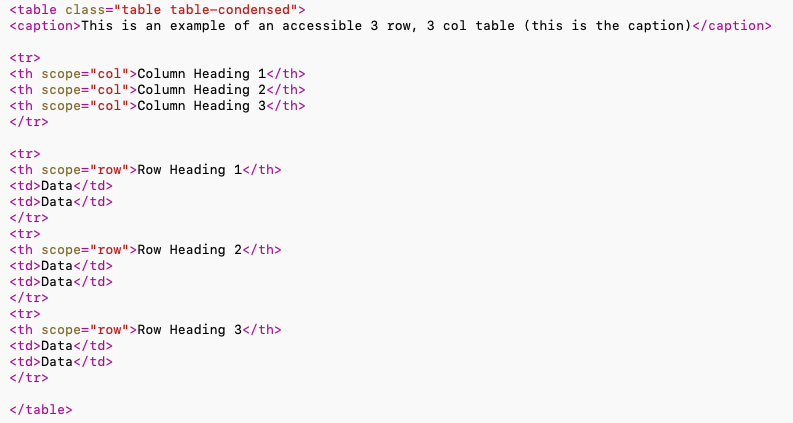
HTML of a table that does use the <thead> element.

Table Borders
Black Borders
Assign the class: table-border-black to apply black borders and improve visual separation.
| Day | Link | Dinner |
|---|---|---|
| Monday | Soup and Salad | Meatloaf |
| Tuesday | Tacos | Steak |
| Wednesday | Sandwiches | Chicken |
| Thursday | Curry | Roast Beef |
| Link | Burgers | Pizza |
HTML: <table class="table table-th-light-gray">
| Day | Link | Dinner |
|---|---|---|
| Monday | Soup and Salad | Meatloaf |
| Tuesday | Tacos | Steak |
| Wednesday | Sandwiches | Chicken |
| Thursday | Curry | Roast Beef |
| Link | Burgers | Pizza |
HTML: <table class="table table-th-light-gray table-border-black">
| Link | Lunch | Dinner |
|---|---|---|
| Monday | Soup and Salad | Meatloaf |
| Link | Tacos | Steak |
| Wednesday | Sandwiches | Chicken |
| Thursday | Curry | Roast Beef |
| Friday | Burgers | Pizza |
HTML: <table class="table table-bordered table-th-medium-blue">
| Link | Lunch | Dinner |
|---|---|---|
| Monday | Soup and Salad | Meatloaf |
| Link | Tacos | Steak |
| Wednesday | Sandwiches | Chicken |
| Thursday | Curry | Roast Beef |
| Friday | Burgers | Pizza |
HTML: <table class="table table-bordered table-th-medium-blue table-border-black">
Cell Alignment
By default, table cell content is aligned to the top. You can change the vertical alignment using the following classes:
- table-align-middle – aligns cell content vertically in the middle
- table-align-bottom – aligns cell content to the bottom
Assign these classes to the table using the same method described above.
| Lorem ipsum dolor sit amet, consectetur adipiscing elit. | Lorem ipsum | Lorem ipsum |
|---|---|---|
| Lorem ipsum dolor sit amet, consectetur adipiscing elit. Vivamus mollis ultrices felis sit amet iaculis. | Lorem ipsum dolor sit amet, consectetur adipiscing elit. | Lorem ipsum dolor sit amet, consectetur adipiscing elit. Vivamus mollis ultrices felis sit amet iaculis. Nulla congue vulputate congue. Donec fermentum, justo eu laoreet placerat, neque quam pellentesque tortor, non lacinia odio mi ac nulla. Ut lacinia iaculis consequat. |
| Lorem ipsum | Lorem ipsum dolor sit amet, consectetur adipiscing elit. Vivamus mollis ultrices felis sit amet iaculis. Nulla congue vulputate congue. | Lorem ipsum |
| Lorem ipsum dolor sit amet, consectetur adipiscing elit. | Lorem ipsum | Lorem ipsum dolor sit amet, consectetur adipiscing elit. Vivamus mollis ultrices felis sit amet iaculis. Nulla congue vulputate congue. |
Class: table-align-middle
HTML: <table table-bordered table-th-light-gray table-border-black table-align-middle">
| Lorem ipsum dolor sit amet, consectetur adipiscing elit. | Lorem ipsum | Lorem ipsum |
|---|---|---|
| Lorem ipsum dolor sit amet, consectetur adipiscing elit. Vivamus mollis ultrices felis sit amet iaculis. | Lorem ipsum dolor sit amet, consectetur adipiscing elit. | Lorem ipsum dolor sit amet, consectetur adipiscing elit. Vivamus mollis ultrices felis sit amet iaculis. Nulla congue vulputate congue. Donec fermentum, justo eu laoreet placerat, neque quam pellentesque tortor, non lacinia odio mi ac nulla. Ut lacinia iaculis consequat. |
| Lorem ipsum | Lorem ipsum dolor sit amet, consectetur adipiscing elit. Vivamus mollis ultrices felis sit amet iaculis. Nulla congue vulputate congue. | Lorem ipsum |
| Lorem ipsum dolor sit amet, consectetur adipiscing elit. | Lorem ipsum | Lorem ipsum dolor sit amet, consectetur adipiscing elit. Vivamus mollis ultrices felis sit amet iaculis. Nulla congue vulputate congue. |
Class: table-align-bottom
HTML: <table table-bordered table-th-light-gray table-border-black table-align-bottom">